
Convert VGA to HDMI with Audio (HDMI to VGA)

VGA to HDMI Central
If you need to convert any VGA or component signal into a digital high definition HDMI signal up to 1080p resolution, this conversion box will do the job perfectly. The only additional thing that you need to get besides this converter is an HDMI cable, a VGA Cable, and audio cable of the appropriate lengths.
New & Improved: VGA to HDMI with Scaling (up to 1080p)
Simply connect the analog VGA output from the PC to the digital HDMI input of your HD ready television and enjoy stunning high definition video from your computer on your TV. The Hammerheads high bandwidth capability supports a wide range of PC and HDTV resolutions with no transmission loss.
Hammerhead - VGA to HDMI (1080p)
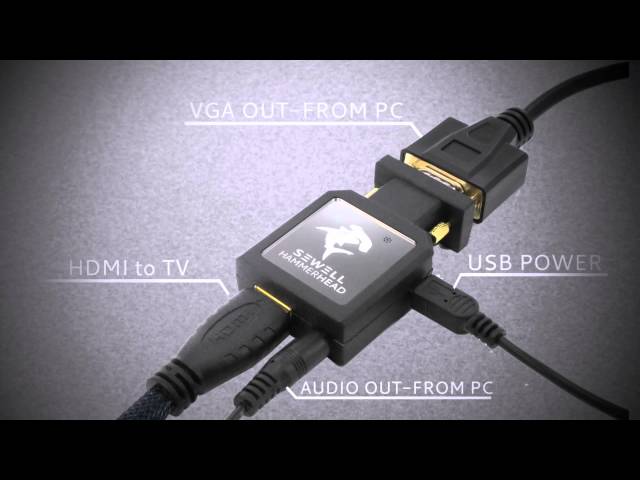
VGA to HDMI Converter - SW-9393
Convert any VGA or Component video with audio into perfect HDMI video signal with integrated audio. This means you can connect any computer that outputs VGA or any other video player that outputs component video (red, green, and blue RCA connection). This converter includes a scaling capability that will fit numerous VGA and Component Video resolutions to your HDMI TV. This ensures easy set-up. You'll never have to worry about fiddling around with your computer's resolutions just to fit your HDMI TV, only to change it back again when you want to use your computer monitor.This isn't something we take lightly here at Sewell Direct. VGA to HDMI conversion has been one of the priority list toppers for us because we know there are a lot of people that need a reliable and simple solution that's also easy on the wallet. After about a year of looking around and testing unit after unit, we've finally found one that is inexpensive and gets the job done right if you're needing 720p.
Best Value: VGA to HDMI Converter with Scaling (up to 720p)
We've tested this VGA to HDMI Converter and it works really well. We take VGA to HDMI quite seriously, having tested many units over the last year or so. This unit has the best value on the market, converting up to 720p perfectly without any bands of color, artifacts, or blips that other modestly priced VGA to HDMI scalers can sometimes have. Of course, if you're wanting 1080p with scaling, you'll need to invest more than 3 times the money. Or you can take a look at the VGA to HDMI without scaling.
Tested In House
Our engineers found this unit to work perfectly, with no bands of color striping the picture, no artifacts or blips, just perfect 720p digital video reproduction of the analog source (VGA and component). A 2-second adjustment of the HDTV's vertical and horizontal on-screen fixed any slight black border around the picture.
Should I get this 720p scaler or a 1080p scaler?
The answer lies within how large your HDTV is. If you can honestly tell the difference between 1080p and 720p on your HDTV, then get the Atlona VGA to HDMI with 1080p scaler. In general we'd recommend 720p scalers for HDTVs less than 37 inches. If you're planning on reading text from your VGA computer on your HDMI TV, then 720p might also be preferred because it will make the characters large enough to read from across the room.
This article describes devices for making a VGA to HDMI conversion. For descriptions of what is needed for other conversions please visit our HDMI converter article.
Other Similar Product Solutions
Our Suggestion for VGA to HDMI Format Conversion and Scaling up to 1080p
As described in more detail below, Scaling is when you convert a video format and you need to go to a different resolution. For instance, if your VGA resolution is 1024 x 768 and you are converting to 1080p, you will need a scaler. We recommend the Atlona VGA to HDMIwith scaler which handles the job cleanly and perfectly with easily adjustable resolutions (that will actually fit your HDTV unlike some other models we've tested), and without staticky artifacts.
Scaling is when you convert a video format and you need to go to a different resolution. For instance, if your VGA resolution is 1024 x 768 and you are converting to 1080p, you will need the Atlona VGA to HDMI with scaler.
720p or 1080p?
If you're trying to decide whether you really want to invest the extra money for the 1080p capabilities, maybe this will help. How big is your HDTV? If it's 37 inches or smaller, chances are your TV either doesn't even support 1080p or it doesn't matter because it looks virtually the same, especially as you approach 32 inches or smaller. If you've got a 42 inch TV or larger, and you plan on using this scaler to read text from your VGA source, 720p will actually work out well since the text will be larger. You'll find yourself using 720p for reading normal sized text from across the room. If it's mainly video that you'll be watching and you have a TV larger than 37 inches, and you consider yourself a "videophile" or one the obsessively loves high definition, then the extra money for a 1080p VGA to HDMI scaler is recommended.
Why The Conversion Box?
You might be wondering why you would need to purchase a conversion box that is obviously more expensive than your average little inexpensive passive adapter. The reason lies within the type of signal that is being transmitted. VGA (or Video Graphics Array) is purely an analog signal. There have been several successors to VGA (like SVGA, XGA, all the way to QXGA) but this only refers to the resolution at which the signal can be viewed (QXGA supports a resolution of up to 2048x1536). HDMI on the other hand is a digital signal, using a DVI type of video signal (Digital Video Interface). So the main reason for the converter box is to translate an Analog signal to a digital one.
Much of the information below is outdated. We recommend you stick with one of the two VGA to HDMI converters talked about above. The below solutions still work well for specific scenarios and are worth mentioning.
We Suggest You Use This for Straight Format Conversion (without scaling):
We suggest you use VGA to HDMI Format Converter With Audio for converting VGA to HDMI. This box handles the job cleanly without artifacts or other unfixable problems. This box does not scale, however. This means that there are very limited resolutions available. We tested it to display 1024x768, but better resolutions are probably possible depending on your VGA source. This option also allows the addition of analog stereo audio (RCA) that allow you to embed audio into your HDMI signal and also allows you to choose whether you are converting an RGB (VGA style) or Component signal.
Other Suggested Options
Another options is the Startech VGA to HDMI converter. This converter is very similar to VGA to HDMI Format Converter With Audio in functionality but is provided as another option. Unfortunately, the Startech part is rarely in stock. Both of these options also provide a way to include stereo audio, turning their VGA and Audio sources into a single HDMI audio/video signal.